The C3PAO assessment process is not a mystery, but most contractors walk in underprepared because they spent all their time implementing controls and none of their time thinking about how to demonstrate them.
Here’s what’s actually happening during a Level 2 assessment and what you need to have ready.
How the Assessment Works
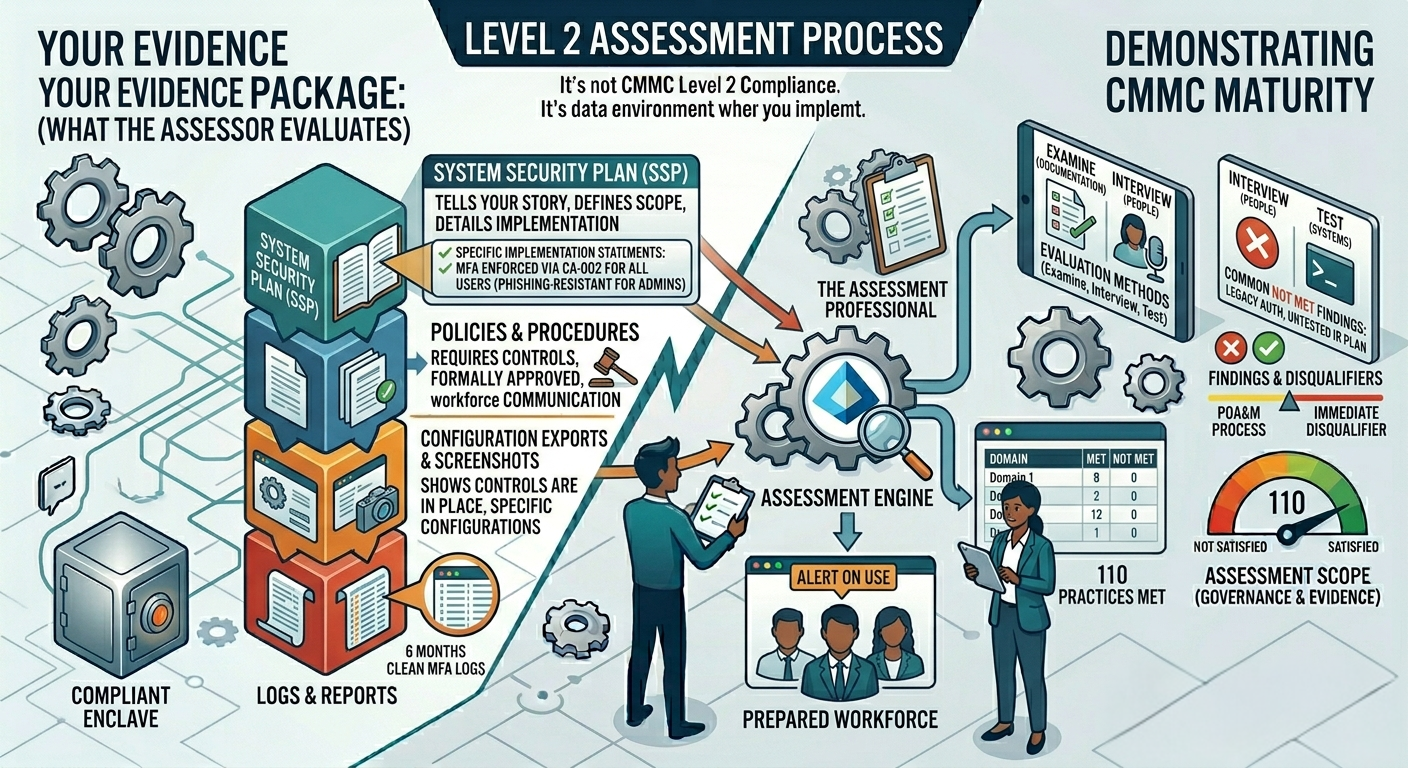
A CMMC Level 2 assessment covers all 110 practices across 14 domains. The assessment team, which will include at minimum a Certified CMMC Assessor and a team lead, evaluates each practice using one or more of three methods: examine, interview, and test.
Examine means they’re looking at documentation. Interview means they’re talking to your people. Test means they’re running something in your environment or watching you run it. For most practices, they’ll use a combination of all three.
The assessment results in a finding of MET or NOT MET for each practice. You need all 110 to hit MET to achieve certification. If practices are NOT MET, you go into a POA&M process for some, but not all, deficiencies. Some findings are immediate disqualifiers.
What They’re Actually Evaluating
Assessors are not trying to trick you. They are trying to determine whether your controls are implemented, whether they work as described, and whether your people know how to operate them.
For each practice, they’re asking essentially these three questions: Is there a policy or procedure that requires this? Is there evidence that it’s actually happening? Do the people responsible for it understand what they’re doing and why? (Note: These questions may not be worded like this, but expect something similar).
A control that’s configured correctly but undocumented is a problem. A control that’s documented but not actually implemented is a bigger problem. A control that’s implemented and documented but that your IT person can’t explain is still a finding.
The Evidence Package
Before your assessment, you should have a complete evidence package organized by domain. For each practice, you need to be able to produce the relevant documentation without scrambling for it during the assessment.
That evidence typically includes your System Security Plan, which should describe how each control is implemented in your specific environment. It includes configuration exports from your systems showing the controls are in place. It includes logs showing the controls are operating. And it includes your policies and procedures showing the requirements exist in writing.
Screenshots are acceptable evidence. Configuration exports are better. Logs showing consistent enforcement over time are best. An assessor who sees six months of clean sign-in logs showing MFA enforced on every authentication is a lot more confident than one who sees a CA policy that was created last week.
Your SSP Is Your Story
The System Security Plan is the document an assessor reads before they set foot in your environment. It tells them what systems are in scope, how your network is segmented, what your CUI boundary looks like, and how each control is implemented.
A weak SSP means the assessor spends the engagement asking clarifying questions instead of validating evidence. A strong SSP means they walk in already understanding your environment and can focus on verification.
Your SSP should be written for a technically competent reader who has never seen your environment before. Implementation statements should be specific. “We use MFA” is not an implementation statement. “All users authenticate using Microsoft Authenticator with number matching enforced via Conditional Access policy CA-002, with phishing-resistant MFA required for all privileged roles” is an implementation statement.
Interviews: Who Gets Asked What
The assessment team will interview people beyond your IT lead. They’ll talk to whoever owns your security program, which in a small organization is often you. They may talk to regular employees to verify that security awareness training happened and that people know the basics. They’ll talk to anyone with a significant security role.
Prepare your people. Not by scripting answers, but by making sure they understand what controls exist, why they exist, and what their role is in maintaining them. An employee who can’t explain why they use MFA or who to call if they get a suspicious email is evidence of a training gap.
Common Reasons Contractors Don’t Pass
The most common findings in Level 2 assessments come from a small number of recurring problems: incomplete or inaccurate SSPs, legacy authentication still enabled, missing or untested incident response plans, no documented risk assessment, device compliance policies that exist but aren’t enforced, and access control that looks right on paper but has exceptions carved out for convenience.
None of these are exotic. They’re all fixable before your assessment if you look for them honestly.
Prepare Like You’re Already Being Assessed
The contractors who do well in CMMC assessments are the ones who’ve been operating their security program as if an assessor could show up at any time. Their logs are clean because they’ve been monitoring them. Their documentation is current because they update it when things change. Their people know what’s expected because training isn’t a once-a-year checkbox.
If you’re preparing for an upcoming assessment and want an outside perspective on where your gaps are, that’s exactly what a readiness review is for. Reach out at info@initcyber.com